Effective discount management is at the heart of any successful sales strategy, offering value to customers while supporting business goals. In our upcoming Version 26, we are taking a significant step forward by overhauling how discounts are calculated, posted, and analyzed within the system.
This initiative aims to make discount management more intuitive for sales managers while simplifying visualization, reporting, and seamless integration into accounting.
By rethinking the structure and logic behind discount management, we aim to simplify processes, enhance clarity, and improve overall usability for all stakeholders.
The vision
The core of this transformation lies in unifying all discount types under a single nomenclature, encompassing:
- Direct Line Discounts
- Bonus Programs
- Promotional Packages
- Charges and Discounts applied through Additional Document Amounts
The key innovation is grouping these into logical categories like "Turnover Discount" or "Volume Discount" regardless of their technical implementation.
Whether the discount stems from direct line discounts, promotional packages, or bonus programs, users can now make cohesive accounting posting and analytics reflecting category-based summaries.
The benefits
This enhanced system will enable:
- Unified Organization: All discount types can be categorized for clarity.
- Consistent Accounting: Discounts can be posted based on their category.
- Enhanced Reporting: Effortless tracking of applied discount amounts.
In the next sections, we will dive deeper into the new features, including how we leverage familiar tools, such as Additional Document Amounts, to deliver these improvements while introducing powerful new functionalities. Stay tuned as we walk through the specific changes that will redefine discount management in Version 25.
A walkthrough
Automated Calculation of Discount Amounts (simplified method with no categorization required)
Complicated calculations of discount amounts are now a thing of the past. In sales orders, five new calculated attributes automatically compute the discount amounts applied at different levels, bonus programs, and promo packages:
- Level 1 Discount Amount
- Level 2 Discount Amount
- Level 3 Discount Amount
- Bonus Program Amount
- Promotional Package Amount
These attributes require no additional setup. They can be easily displayed in the sales order lines panel or accessed through the domain attribute navigator for reporting and analytics.

Discount Categories
One of the key enhancements involves categorizing different discounts into specific categories. These categories will also serve as the foundation for tracking, recording, and distributing discounts across sales orders.
To make this happen, we used a familiar tool, the existing Document Amount Types. Now, they have 3 new distribution algorithms. If you want to specify if this Document Amount Type categorizes Line Discounts, Bonus Programs, or Promotional Packages, you should simply select one of the three new values when creating a new Document Amount Type. The value will be set in the Distributed By filed.
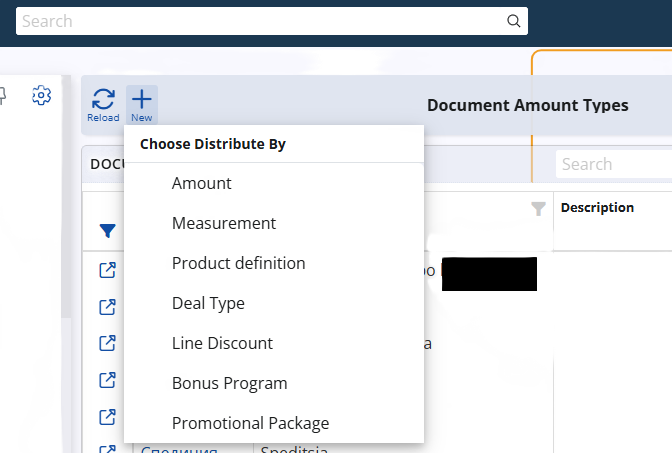
The "Distributed By" field now serves as a layout category for Document Amount Types. This enhancement allows you to create tailored layouts for different distribution algorithms directly in the web interface. For instance, for Document Amount Types using the Line Discounts distribution algorithm, you can show the panel that lists all line discounts associated with that category.
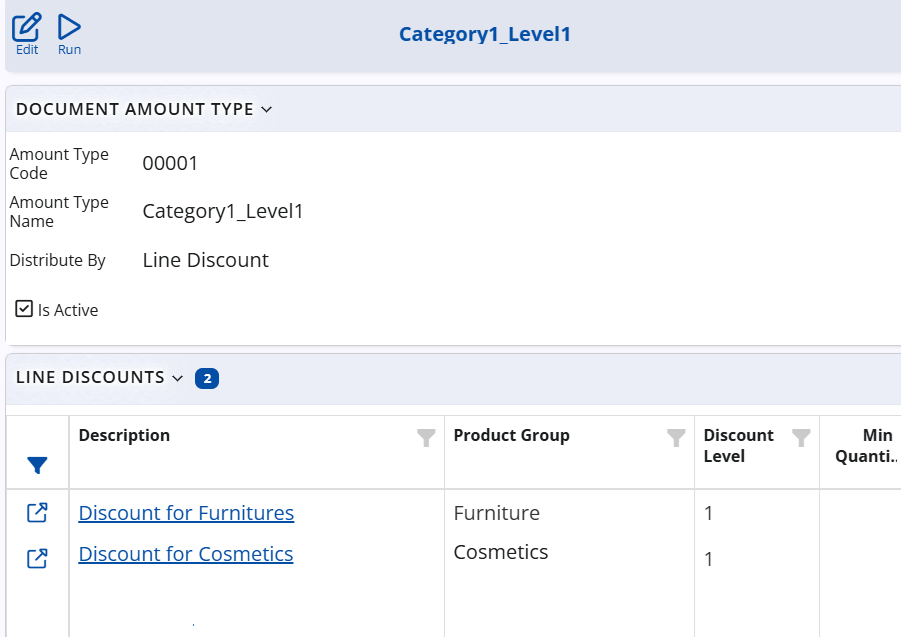
Simplified Tracking and Recording
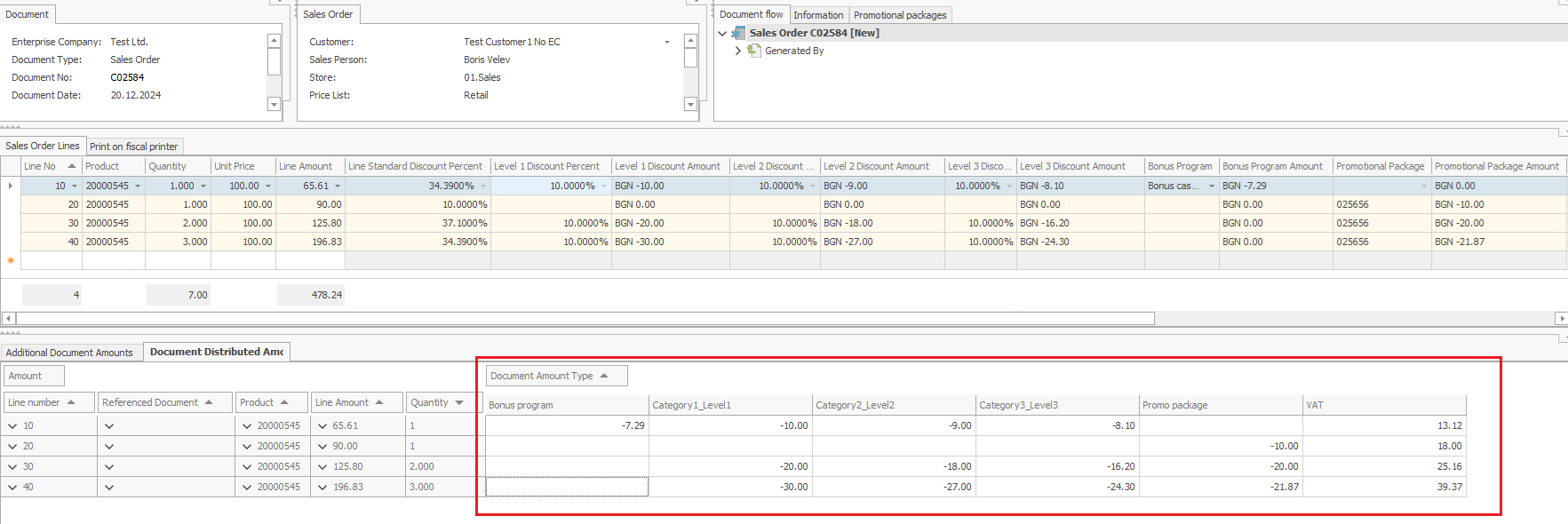
Once discount categories are defined and linked to discounts, bonus programs, or promotional packages, the system automatically records the applied discount amounts in the Document Distributed Amounts panel of the sales order. This seamless integration ensures a unified view of all discounts applied to each sales line.
By centralizing discount information, users no longer need to worry about discrepancies caused by changes to discount definitions after they’ve been applied. This reliability ensures transparency and consistency in discount tracking and accounting.
Streamlined Discounts Posting
To further enhance the accounting process, we’ve developed new features that simplify the posting of discount amounts:
-
Direct posting of calculated attributes
The new system-calculated attributes for discounts can now be posted directly when generating an Accounting Voucher from a Sales Order. This straightforward method doesn't need discount categorization. However, users who wish to post discounts are use reports by category should still use the categorization feature.
-
Posting of the Distributed Amounts
A new distributed amounts posting mechanism has been introduced for various document templates, including:
- Sales Orders
- Purchase Invoices
- Invoices (Invoice line and Related Sales Order Lines)
This feature enables businesses to post distributed amounts for all types of additional amounts. It includes traditional types (such as transportation, document discounts, and others) but is also a key feature for posting discounts by their category.
Accounting Discounts by Category
Thanks to categorization, discounts can now be posted by category effortlessly. Using the new distributed amounts posting mechanism, all you need to do is set up a template by selecting a specific discount category from a dropdown list. This will automatically calculate the distributed amounts to the particular source line.
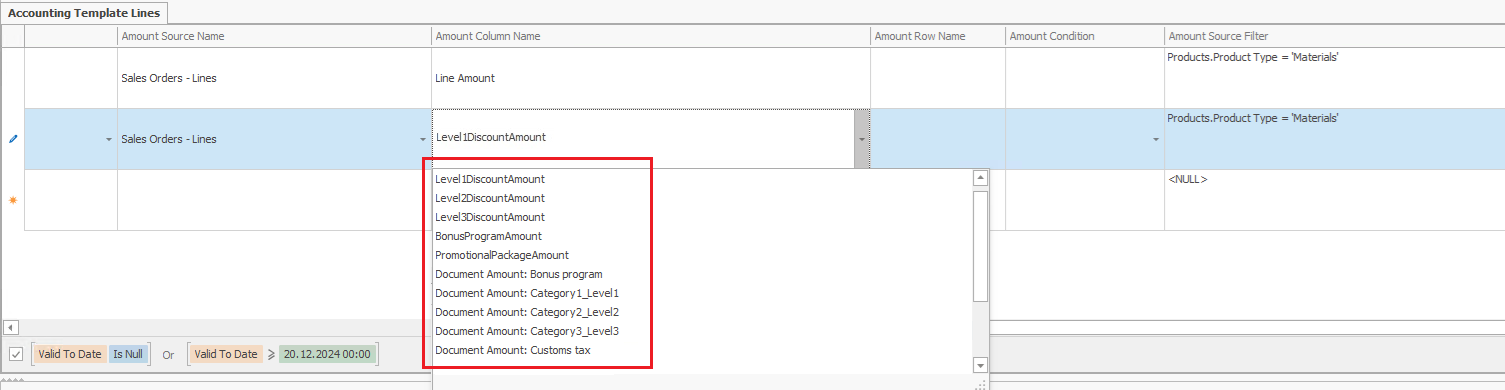
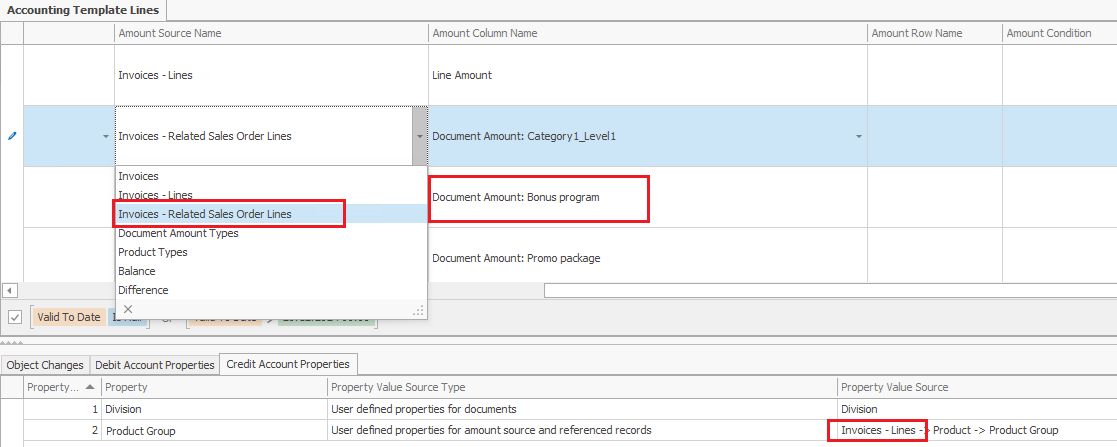
A New Amount Source in the Templates "Invoices - Related Sales Order Lines"
We’ve introduced a brand-new source in invoice templates: Invoices - Related Sales Order Lines. This source allows easy posting of the discounts applied to sales order lines while getting the specified analytical dimensions from the invoice document and its lines.
We have taken into account the fact that the invoice might contain only a part of the sales order quantity. For this reason, the system calculates the proportional discount amount based on the invoiced quantity. This ensures precise and accurate accounting across documents, even in complex scenarios.
Enhanced Security for Document Amount Types
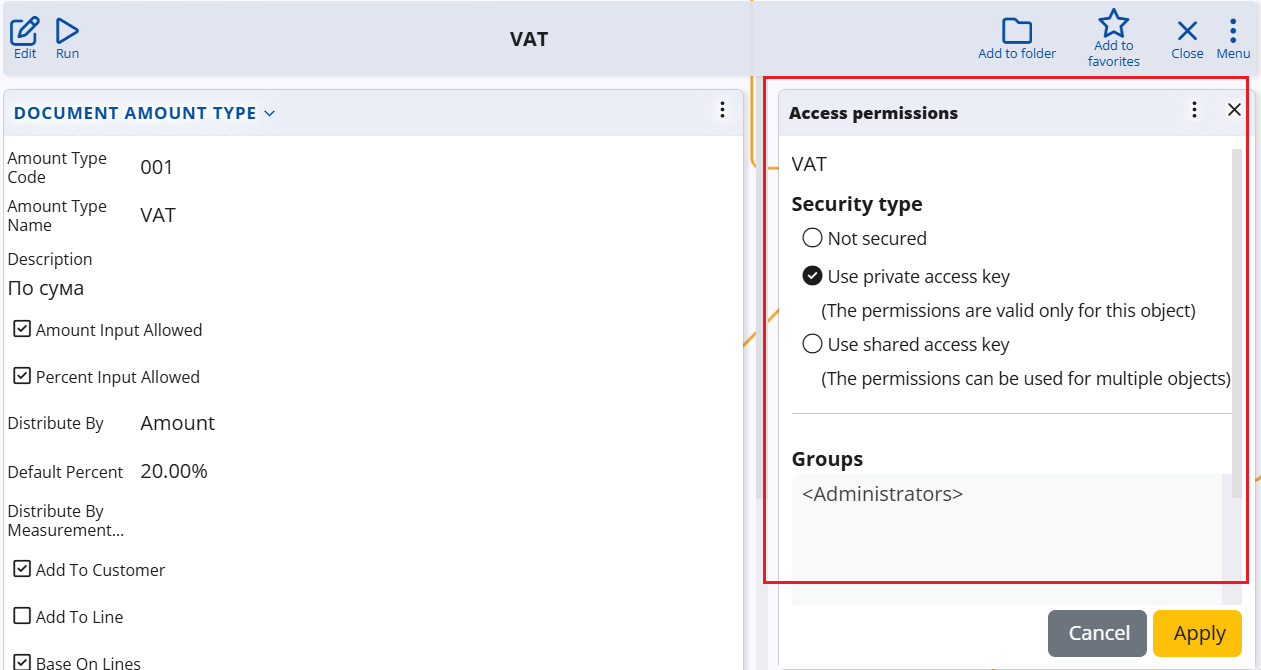
Discount categories, represented as Document Amount Types, are now easier to manage and more secure. Previously, these configurations were primarily handled by system administrators or key users. However, with the introduction of categorization, sales teams can now define and manage new discount categories directly.
To ensure accuracy and prevent unintended changes, we’ve added Access Permissions functionality aka Security to Document Amount Types. This feature enables administrators to lock critical categories—such as VAT types—so only authorized users can modify them. This added layer of security reduces the risk of errors while maintaining the system's flexibility.
Conclusion
Version 25 revolutionizes discount management in ERP.net by offering powerful new tools for categorization, tracking, and accounting. Whether you're looking to simplify reporting, enhance security, or improve accounting precision, these updates are designed to make your operations smoother and more reliable.
Stay tuned for more updates as we continue to refine and enhance ERP.net for your business needs!

0 Comments